Video Downloader For Pinterest
- 4.6
- Rating
- 5.00M
- Installs
- Free
- Price

 Analysis by App-foxy
I tested Video Downloader For Pinterest as a focused tool for saving Pinterest videos, and my first impression was clear: it is built for one job rather than trying to become a complete video editor or a general download manager. That narrow purpose is also its main appeal. If Pinterest is where you regularly discover cooking demonstrations, workout clips, craft instructions, travel ideas, or short tutorials, having a dedicated downloader can feel more convenient than repeatedly searching for a way to keep a useful clip available.
The app belongs to the video players and editors category, although its practical role is closer to a Pinterest video-saving utility than an editing suite. It is developed by Hatici Video Downloader Apps, is free to install, and is suitable for Everyone. The app has been available since May 28, 2021, and its current version is 2.557, with Android 7.0 or later required.
What matters most in daily use is not a long feature list but whether the path from Pinterest discovery to saved video feels simple. In my experience, the app makes the most sense for people who want to preserve selected clips for later viewing, especially when they do not want to depend on Pinterest search every time they need to find the same idea again.
You May Also Like

 Blood Strike: 2.5 Anniversary
Blood Strike’s Loadouts Turn Every Drop Into a Tactical Gamble
A close look at Blood Strike’s custom loadouts: how fast access to signature weapons reshapes its battle royale rhythm, rewards preparation, and narrows the gap between fights.

 Pandora - Music & Podcasts
Pandora’s Music Is Easy to Start, but Harder to Recover
Pandora’s strength is its low-effort path from a seed to a station. Its weak spot is how much confidence it asks you to place in connection, setup, and quiet recovery.

 8 Ball Pool
 Is Built on Rivalries, Rematches, and Routine
A close look at the rivalries, rematches, shared routines, and unanswered safety questions that turn a quick pool match into a persistent mobile community.

 Samsung Music
’s Quiet Strength Is Playing What You Already Own
Its reach comes less from spectacle than from dependable access to a personal library. That simplicity is both the app’s strongest retention engine and its ceiling.

 AccuWeather: Weather Radar
AccuWeather Review: A Quick, Clear Forecast for Everyday Decisions
For everyday plans, the best forecast is the one you can understand quickly. AccuWeather makes rain timing, radar, and local conditions easy to act on, with a few trade-offs.

 Hill Climb Racing
Why Hill Climb Racing Still Turns Crashes Into One More Run
A tiny car, a bumpy hill and one more upgrade: Hill Climb Racing keeps resurfacing because its simple chaos makes every near-miss feel personal.
More From Our News Desk



How the app fits into a real Pinterest workflow
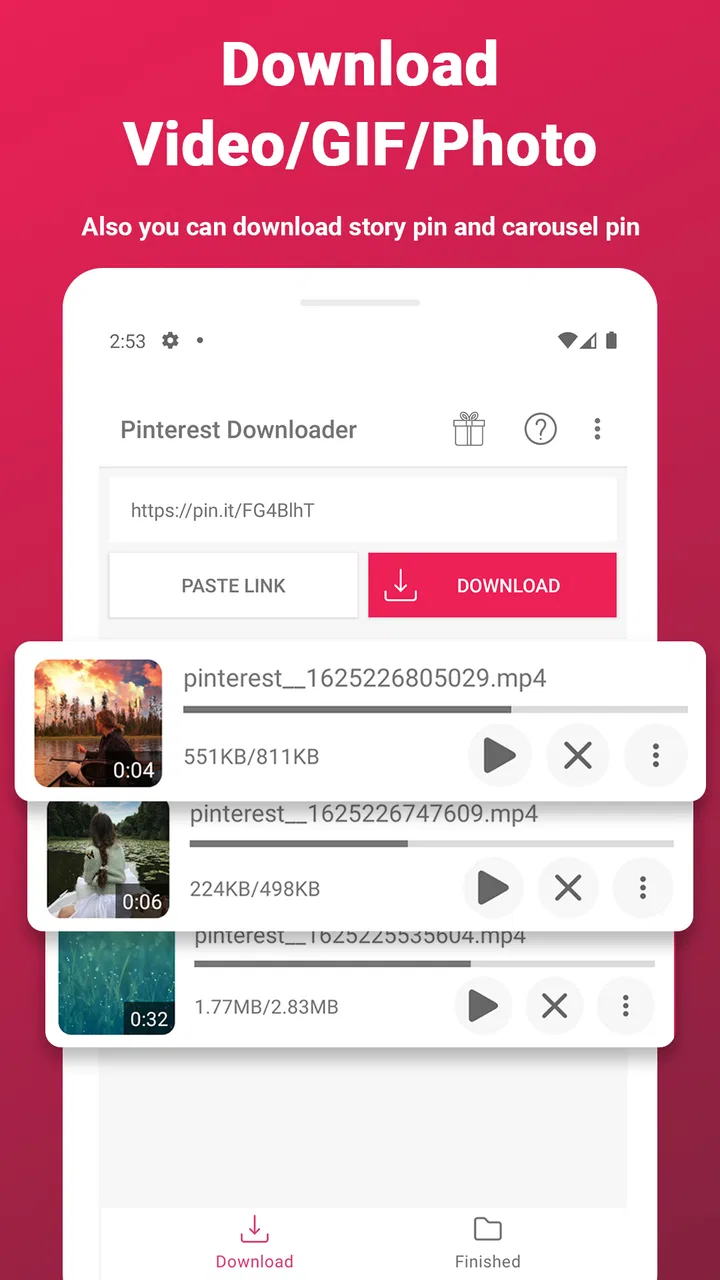
The most practical way to think about this app is as a bridge between Pinterest browsing and personal video storage. You find a video on Pinterest, use the sharing or copying step available on your phone, and then bring that content into the downloader. The exact comfort of that process depends on how familiar you are with Android’s share controls and clipboard, but the concept is straightforward.
I found this workflow particularly useful for short instructional content. Imagine saving a bread recipe demonstration before going grocery shopping, collecting a few home-organization clips for a weekend project, or keeping a stretching routine ready for a place with unreliable connectivity. In those situations, the value is not discovering more content; it is reducing the effort needed to return to something you already chose.
That distinction is important. This is not the right app if you expect a full Pinterest replacement, a social feed, or a professional editor. It is also not a universal solution for every kind of online video. Its identity is tied to Pinterest, so the more often you save videos from that platform, the more relevant it becomes.
What the free access means in practice
The app is free to install, which makes trying the basic workflow relatively low-risk. The store also lists in-app purchases ranging from $1.99 to $24.99 per item. I would therefore approach it as a free-entry app with optional paid value rather than assuming that every convenience or enhancement is included without charge.
That pricing range is broad enough that I would avoid paying immediately. First, I would test whether the free experience handles the kind of Pinterest clips I actually want to save, whether the process fits my routine, and whether the resulting files are easy to locate afterward. If the unpaid version already covers occasional downloads, spending money may not add enough value.
For frequent users, paid access can be easier to justify if it removes a recurring annoyance or makes regular saving more comfortable. Still, the right decision depends on the specific purchase screen and the benefit offered there. I would read the wording carefully before confirming anything, especially if I only need the app for a one-time collection of videos.
Where the app delivers useful value
The strongest benefit is focus. Many general download tools make users navigate several unrelated settings, while a Pinterest-specific app is easier to understand conceptually. You are not installing it to manage every file on your phone; you are installing it because a particular kind of Pinterest content is worth keeping.
Another useful advantage is repeatability. Once you learn the handoff from Pinterest to the downloader, saving another clip should feel familiar. That matters when you are collecting several references for a project. Instead of treating every video as a separate technical problem, you can follow the same basic routine and spend your time choosing useful content.
I also like the idea of separating saved material from the Pinterest feed. A feed is designed for discovery, so older items can become difficult to relocate. A downloaded clip can be available in your device storage and easier to review when you are preparing a meal, working on a craft, or comparing several exercise demonstrations. That is a practical organizational benefit, even though it does not turn the app into a full media library.
There is also a subtle advantage for people who use Pinterest as a visual notebook. Saving selected videos creates a more deliberate collection than simply liking everything that looks interesting. I recommend using a small naming or folder routine in your phone’s file manager after downloading. For example, separating recipes, workouts, and project references makes the app more useful over time than leaving every file in one crowded location.
Small workflow choices that make a difference
One of my main tips is to decide what deserves saving before downloading in bulk. Pinterest encourages fast scrolling, and it is easy to collect clips that seemed interesting for a few seconds but never become useful. A short pause before each download keeps storage cleaner and makes the resulting collection easier to trust.
A second tip is to check the saved file soon after the download. Open it, confirm that it plays properly, and make sure it is stored where you expect. This is especially sensible when the video will be needed for a planned activity, such as following a repair demonstration or cooking from a visual recipe. Discovering a problem at the moment you need the clip is far more frustrating than checking it earlier.
A third practical habit is to treat downloaded videos as personal reference copies, not automatically as material for reposting. Pinterest content may belong to its original creators, and saving something for offline personal use is different from publishing it elsewhere. If you intend to share a clip publicly, I would look for the creator’s permission and respect any applicable rights instead of assuming that downloading grants redistribution permission.
Finally, remember that downloads consume local storage. Short clips may not seem significant individually, but a large collection can become untidy. Periodically remove videos you no longer need, particularly after finishing a home project or learning a recipe. This housekeeping is easy to overlook because the app’s purpose encourages accumulation.
Limitations I would consider before relying on it
The app’s specialization is both its strength and its boundary. If your videos come from several platforms, a broader tool may reduce the need to switch between separate downloaders. Installing a Pinterest-focused app alongside other platform-specific utilities can become inconvenient, especially if you only download occasionally.
The process may also feel less appealing to users who want everything to happen inside one screen. Depending on how you start a download, moving between Pinterest, the system share menu, and the downloader adds a few steps. For regular users that sequence can become familiar, but people who expect a single-tap experience may find the handoff less seamless than anticipated.
Another trade-off is that downloading does not solve every access problem. A clip can still be affected by its original availability, the way Pinterest presents it, or the quality of the source. I would not treat the app as a guarantee that every Pinterest video will behave identically. The sensible approach is to test the particular content you care about rather than judging the app only from its name.
Storage management is another real consideration. The app can help you keep videos, but it does not replace the need for a sensible filing system. If you save everything without reviewing it, the benefit of quick access can disappear under a pile of forgotten files. Users who dislike managing local media may prefer simply bookmarking content inside Pinterest.
There is also a difference between convenience and editing power. Someone looking for trimming, captions, transitions, audio controls, or a polished publishing workflow should choose a dedicated video editor instead. Video Downloader For Pinterest is useful before an editing task, but I would not install it expecting those creative tools.
Who is most likely to get their money’s worth
I think the best audience is the frequent Pinterest user who repeatedly returns to video-based ideas. This includes people who collect recipes, DIY instructions, fitness demonstrations, study references, decorating inspiration, or travel clips. For them, a dedicated saving routine can be more useful than relying on an increasingly difficult-to-search feed.
It is also a reasonable choice for someone who wants to test a free tool before considering optional purchases. The free installation lets you judge the central workflow with your own Pinterest habits. I would not recommend buying anything until you know how often you use it and whether the free experience already solves the problem.
The app is less convincing for a casual Pinterest visitor who saves only an occasional image or video. That person may be better served by Pinterest’s own saving features, because installing another app adds maintenance without necessarily creating a meaningful improvement. Likewise, users who mainly watch videos from other services should look for a tool designed around those services instead.
It is not my first recommendation for creators who need a complete content-production pipeline. A downloader can be one step in gathering references, but it does not replace an editor, a cloud library, or a rights-management process. If your goal is to produce and publish polished videos, the money would be better directed toward software built for editing and organization.
How it compares with the usual alternatives
The most obvious alternative is to keep videos inside Pinterest through saves or boards. That approach is simpler and avoids filling device storage, but it depends more heavily on returning to Pinterest and finding the correct pin again. The downloader is more useful when offline access or a separate personal collection matters.
A general download manager may be more versatile across different websites, but versatility often comes with a less focused interface and more decisions. For someone who downloads from Pinterest frequently, the dedicated approach can feel easier to understand. For someone who downloads from many sources, the general option may be more efficient overall.
A screen recorder is another possible workaround, but I would consider it a poor substitute for a purpose-built downloader when a direct saving workflow is available. Recording can capture unwanted interface elements, require real-time playback, and create larger or less convenient files. It makes more sense as a fallback for content that cannot be saved through the normal route, not as the preferred everyday method.
Cloud bookmarking services offer a different kind of organization. They preserve access to a reference without necessarily creating a local copy, which is better for users who want to avoid storage use. The dedicated app is more appealing when the goal is to have a video ready on the device, but that convenience comes with the responsibility of managing those files.
Performance expectations and day-to-day comfort
The app has reached over five million installs and holds a 4.6 average from around seventy-one thousand ratings, which suggests that its basic concept has found a substantial audience. I treat those figures as useful context rather than a promise that every device or Pinterest link will behave the same way. My own recommendation remains to test the exact workflow you need.
Because the app requires Android 7.0 or later, most relatively modern Android phones should be within its supported range, while older devices may need checking before installation. The Everyone content rating also makes it broadly approachable from an age-classification perspective, though responsible use still means respecting creators and the rules surrounding downloaded material.
I would keep expectations modest about the word “fast.” Speed depends on the source, network conditions, device storage, and the particular video being processed. A dedicated app can make the steps clearer, but it cannot make a slow connection behave like a fast one. If a download is important, I would start it while connected to a reliable network and verify the result afterward.
My buy-or-skip recommendation
My recommendation is to try the free version first and pay only when the app becomes part of a regular Pinterest routine. It offers a clear, specific solution for people who want local copies of Pinterest videos, and its focused design is more appealing than a complicated general-purpose workaround for that single task.
I would choose it for a Pinterest-heavy workflow involving repeated reference clips, especially when I need to revisit material away from the feed or keep a project collection on my phone. I would skip it if I rarely download videos, prefer bookmarking everything online, need support for many unrelated platforms, or expect editing and publishing tools.
The optional purchases, priced from $1.99 to $24.99 per item, make it important to judge paid value against actual frequency of use. Occasional users should be cautious about paying for convenience they may rarely notice. Frequent users can reasonably consider an upgrade if it directly removes friction in their routine, but I would still inspect the specific purchase terms before confirming.
Overall, I see Video Downloader For Pinterest as a practical specialist rather than a complete media solution. It earns its place when Pinterest videos are genuinely useful to you and you want a repeatable way to keep them close at hand. If that describes your habits, the free starting point is worthwhile; if it does not, Pinterest’s own saving tools or a broader video solution may be the better fit.
FAQs for Video Downloader For Pinterest
01Is Video Downloader for Pinterest free to use?
Yes, Video Downloader for Pinterest is free to download and use. However, the app may contain ads, which help support its development. Some features might also have premium options available for purchase, providing an ad-free experience or additional functionalities.
02How does Video Downloader for Pinterest work?
The app allows users to download videos from Pinterest by copying the video link and pasting it into the app. Once pasted, the app processes the link and offers options to save the video directly to your device. This makes it easy to access your favorite content offline.
03Is it legal to download content from Pinterest using this app?
Downloading content from Pinterest with third-party apps can raise legal concerns. It's crucial to respect copyright laws and the platform's terms of service. Always ensure you have permission from the content creator before downloading and sharing their work.
04What devices are compatible with Video Downloader for Pinterest?
Video Downloader for Pinterest is available for both Android and iOS devices. Ensure your device meets the app's minimum system requirements for optimal performance. Check the app store description for detailed compatibility information before downloading.
05How can I ensure my data is safe while using the app?
To keep your data safe, download Video Downloader for Pinterest from official app stores like Google Play or the Apple App Store. These platforms conduct security checks to minimize risks. Also, review the app's privacy policy to understand how your data is handled.
Pros
- Easy to navigate interface.
- Fast download speeds.
- Supports multiple video formats.
- No login required.
- Ad-free experience.
Cons
- Limited to Pinterest videos.
- No batch downloading.
- Requires stable internet connection.
- No built-in video editor.
- Can’t download private pins.

Video Downloader For Pinterest
Gallery